
Typing Speed Test
Typing Speed Test
What the typing speed test measures
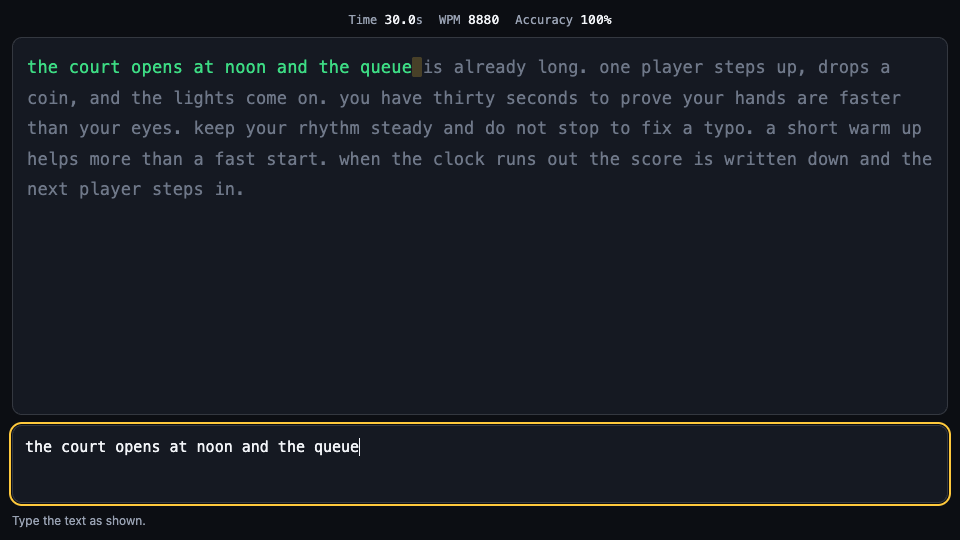
This test measures two things in the same thirty seconds: how fast you type, and how often you get it right. The text appears in a monospaced block above the input box, every character you type is marked as correct or wrong as you go, and when the clock runs out the page reports your words per minute and your accuracy percentage.
Words per minute is calculated with the standard rule used by most typing tests: one word is five characters. The test counts the characters you typed correctly, divides by five, and converts that into a per-minute figure based on the time you actually spent typing. Accuracy is correct characters divided by the characters you typed.
How to play
Press Play Typing Speed Test to open the game in the frame at the top of this page. Click the text box and start typing the paragraph you see above it. The clock starts on your first key, so there is no rush to begin.
Type the text exactly as it appears. Every character is compared against the target text: correct characters turn green, wrong ones are marked in red, and the current position is highlighted so you can keep your place. The run ends after thirty seconds or when you enter the full passage. Use Try again to start a fresh run.
Reading your score
Two players can have the same words per minute and very different results. Someone typing at 70 words per minute with 98% accuracy is producing usable text; someone typing at 70 with 80% accuracy is producing a mess that takes longer to fix than to retype.
That is why the test reports both. Speed without accuracy is not a useful skill, and accuracy without speed is what you already had before you started practising. The interesting number is the pair moving together.
How to type faster without losing accuracy
- Accuracy first, speed second. Typing evenly and correctly is faster overall than racing ahead and correcting. Every backspace costs more time than a steady keystroke.
- Do not stop to fix a mistake. The test marks errors but does not require you to repair them; hesitating over one wrong letter breaks the rhythm of the next ten words.
- Keep your hands on the home row. On a QWERTY keyboard that means the fingers resting on A, S, D, F and J, K, L, semicolon, with the thumbs on the space bar.
- Look at the text, not your hands. Watching your fingers forces you to look up and find your place again, and that lost second is visible in the score.
- Sit up and keep your wrists level. A low keyboard and bent wrists slow you down more than most people expect.
A note on comparability
Your words per minute depends on the keyboard, the layout, the language and whether the text is a familiar paragraph. This test uses one fixed paragraph in plain English, which makes today's run comparable with next week's run on the same device. It does not make your score comparable with someone typing on a mechanical keyboard in another language, and that is fine: the number works best as a personal baseline.
More from the court
All gamesFrequently asked questions
How is words per minute calculated?
The standard formula: one word equals five characters. The test counts the characters you typed correctly, divides by five, then converts that to a per-minute figure using the time you spent typing.
Does accuracy affect my score?
Speed uses correctly entered characters only. The accuracy percentage separately reports what fraction of your input matched.
Does the clock start immediately?
No. The thirty seconds start on your first key press, so you can get your hands in position first.
Can I use a phone keyboard?
You can, but a phone keyboard changes the result so much that it is not comparable to a desktop run. Use it for fun, and use a physical keyboard when you want a real baseline.
How do I compare two runs?
Use the same keyboard and passage. Record words per minute together with the accuracy percentage.
What did you score? Share how your run went.